Hacker Newsnew | past | comments | ask | show | jobs | submitlogin

You can. KDE Wayland allows you to even set fractional scaling. I had 125% on one monitor and 100% on three others. all work like a chgarm


How did you arrive at 125%? What is the formula? Just eyeballing?

I set DPI so that a 15pt font occupies 15pt physical space on screen. Not sure how to set DPI using fractional scaling.


The formula is DPI ÷ 96. 100% is 96 dpi, 125% is 120 dpi.

Doesn't that depend on how far you sit from the screen?

My monitor DPI is 70. 70/96 is 0.73, but there doesn't seem to be a way to set 73%?

You might be out of luck. I don't think it's possible to set the scaling lower than 100%. DPI scaling is primarily concerned with high-DPI.

That is why some of us still need X11 support.

I could set my screen to 75%, not really 73% but close may be?

How did you do it? It doesn't allow any value below 100%?

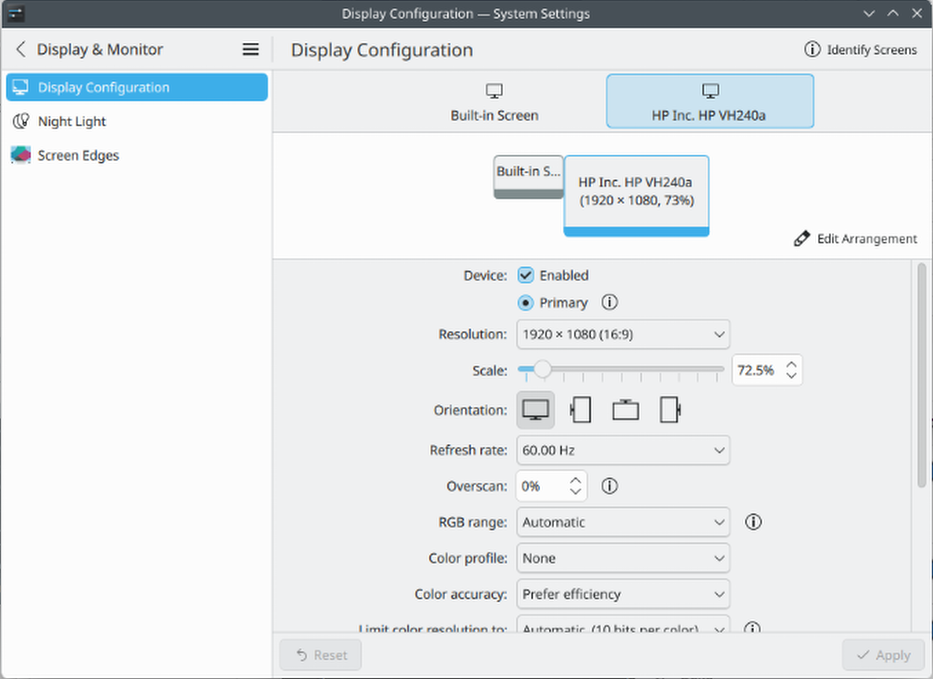
On KDE you can just type a number into the scale percentage field in the display configuration settings pane. I typed "73" and it snapped to 72.5 which is probably close enough.

I don't know whether GNOME supports anything similar, unlike KDE they really don't like giving users very many configuration options.


I tried it on KDE Plasma(6.5.3) just now and it resets to 100%.

Weird, mine lets me go down to 50%: https://files.catbox.moe/gjuzl6.png . Out of curiosity, do you use an nVidia graphics card? I know in the past their drivers have had problems with scaling on Linux.

The other commentator is right. I have an AMD graphics card and I can do this as well. https://imgur.com/a/7mjm8O9


Guidelines | FAQ | Lists | API | Security | Legal | Apply to YC | Contact

Search: