Hacker Newsnew | past | comments | ask | show | jobs | submitlogin

Wayland has still no way to set DPI of multiple monitors. The fonts look terrible on it. I had to move to KDE Plasma on X11 ever since GNOME started forcing Wayland on us.

I guess I have to buy a 4K monitor in future.


If you haven't tried KDE on Wayland in a while, do try it. Fonts looking terrible on Wayland was a GNOME thing, and KDE/Kwin handles display scaling and mixed DPI fine, GNOME/Mutter didn't until very recently.

KDE had the setting to allow X11 apps to scale themselves (no more blurry XWayland apps) years ahead of GNOME.


I thought this problem was Wayland's reason for existing?

Nah mate, it's all about the Wayland Trust model. No keylogging, consent-based screen recording, and no window spying. Isolation.

https://www.x.org/releases/X11R7.6/doc/xextproto/security.ht...

Notice the date.. 1996

(for those that didn't click the link, that is the X11 security extension which address all that, and it was published ~30 years ago).


Sure it does. I have that set right now... Fonts looking terrible seems to only be when using an x app on wayland

> Fonts looking terrible seems to only be when using an x app on wayland

I suspect the original commenter had an issue with GNOME specifically, as I've noticed it too, on Wayland native apps. GNOME handled fractional scaling poorly, and fonts didn't align to the grid right and looked fuzzy at anything that's not 1x or 2x scale.

KDE got this right from day 1.


How to do it? I am not talking about fractional scaling.

Display settings in kde

You can. KDE Wayland allows you to even set fractional scaling. I had 125% on one monitor and 100% on three others. all work like a chgarm

How did you arrive at 125%? What is the formula? Just eyeballing?

I set DPI so that a 15pt font occupies 15pt physical space on screen. Not sure how to set DPI using fractional scaling.


The formula is DPI ÷ 96. 100% is 96 dpi, 125% is 120 dpi.

Doesn't that depend on how far you sit from the screen?

My monitor DPI is 70. 70/96 is 0.73, but there doesn't seem to be a way to set 73%?

You might be out of luck. I don't think it's possible to set the scaling lower than 100%. DPI scaling is primarily concerned with high-DPI.

That is why some of us still need X11 support.

I could set my screen to 75%, not really 73% but close may be?

How did you do it? It doesn't allow any value below 100%?

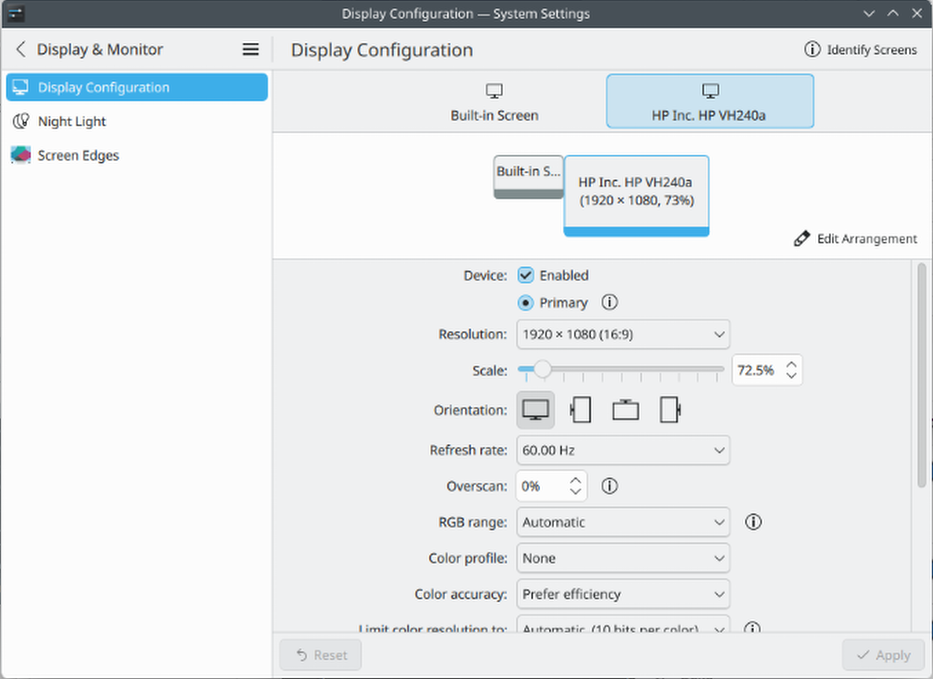
On KDE you can just type a number into the scale percentage field in the display configuration settings pane. I typed "73" and it snapped to 72.5 which is probably close enough.

I don't know whether GNOME supports anything similar, unlike KDE they really don't like giving users very many configuration options.


I tried it on KDE Plasma(6.5.3) just now and it resets to 100%.

Weird, mine lets me go down to 50%: https://files.catbox.moe/gjuzl6.png . Out of curiosity, do you use an nVidia graphics card? I know in the past their drivers have had problems with scaling on Linux.

The other commentator is right. I have an AMD graphics card and I can do this as well. https://imgur.com/a/7mjm8O9

> Wayland has still no way to set DPI of multiple monitors.

It does, but not every DE expose that functionality. There is some command that should be DE-agnostic like wlr-randr that should allow you to do that.


Guidelines | FAQ | Lists | API | Security | Legal | Apply to YC | Contact

Search: