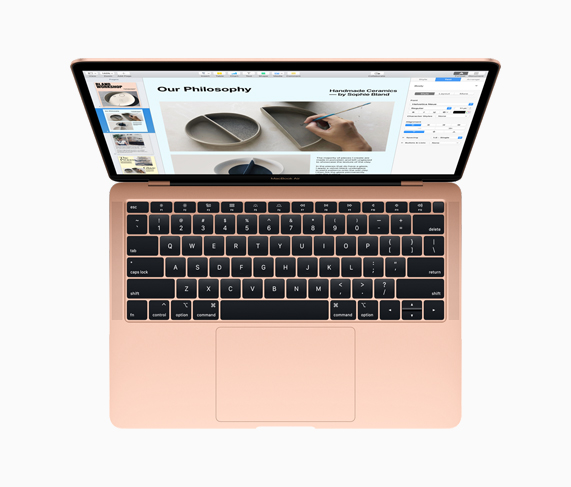
Wish there was an option to buy a 15 inch with no touch bar. I cannot find any suitable use for it on my current model, and I often hit items inadvertently due to the lack of tactile feedback
I've been using MacBook Pro's with the touch bar for a while now, but I just picked up a MacBook Air (in addition to my MacBook Pro). It has a mechanical top row, with just the Touch ID button at the end and it's fantastic. It's so nice to have those keys back! I would pay $100 extra for a MacBook Pro without the touch bar.
Yeah, it's great. When I use my MacBook Pro at my desk, I just use an external keyboard and that covers a lot of usage time where I don't have to deal with the touch bar.
I actually really like the touch bar. I'd enjoy my 2016 MBP if it wasn't for the 2 keys that are now unreliable on the keyboard. That and the fact that it crashes every time the battery runs out.
I like the touch bar too. I just want the Esc key back (although they did add the option to remap CapsLock to Esc, so hurray for that, but honestly it was a delayed feature.)
I have the Caps Lock key mapped to Control (for Unixy things, especially Emacs), and the Control key mapped to Escape -- which, incidentally, improves locality of the Force Quit key combination.
> I actually really like the touch bar.
An app called Pock supposed to make it vaguely useful, but fails to display consistently...
> the fact that it crashes every time the battery runs out.
This. Mine crashed with caffeinate on and would boot into state where display is off. Took me an hour and bunch of stress reset SMC/NVRAM/etc that brought it back to life.
I never got why, if they really want the touch bar, they don't do both. F-keys and touch bar. I kinda would have welcomed this because the "fn" key is a horrible presence on any laptop keyboard anyway and I'd happily would have seen them delegate screen brightness and audio to the touch bar as a separate input.
Getting away from Fn entirely is tough -- it's still useful as a way of simulating keys like PgUp/PgDn/Home/End (Fn+arrows) and forward delete (Fn+Backspace).
Why laptop makers deleted those keys from the keyboard I'll never understand. With just an extra column of keys to the right of Enter, you get delete, page up, page down, home, and end. All very useful keys, right at your fingertips. Panasonic does it right on their rugged laptops, and some other manufacturers still have those keys on some business models, but most have done away with them.
I mean, look at the Dell XPS 15 keyboard. All that space on both sides of the keyboard, and yet they make us chord to do something as simple as Page Down.
My guess is that Apple is using the idiot bar as a trial balloon for abolishing physical keyboards altogether in favor of a touch interface (perhaps one with reconfigurable raised bumps for keys).
Are you sure you wouldn't rather have the 2008-2012 body? It's a bit easier to upgrade or repair.
(At work I have a 15" MBP with the 2013 body. I'm eligible for upgrading it, but what would I replace it with that could possibly be better? Literally the only downside that I care about is the fact that most conference rooms at work no longer have magsafes lying around.)
The big improvement in the 2012-2015 body is that getting rid of upgradability and the optical drive allowed putting in a huge battery (basically the max allowed on airplanes). It also cut the weight by more than a pound.
There's a lot to love in the 2013-2015 line, but the 2008-2012 series will always have my heart. I've never had a laptop so easy to work on, and being able to put two drives in a portable is icing on the cake.
Yup, I'm on an old top-of-the-line 2011 that I swapped out the DVD for an extra SSD. It's spoiled me — such that to replace it I want 16-32GB of RAM and 1TB SSD.
Why do you say that? Isn't that entirely a personal preference thing? I have preferred any good non-Apple touchpad I have tried to Apple's. (To be fair, 90% of laptops sold ship with cheap, terrible touchpads.) The touchpad on my Dell XPS is a good example; zero finger friction, physical left/right buttons at the bottom of the touchpad, and perfect sensitivity / detection of tap to click and two finger scroll. The drivers support "natural" scrolling too.
On the other hand, Apple's touchpads have to be configured to even enable tap-to-click(?!), and click-and-drag doesn't even work with it... On pretty much any non-Apple touchpad and OS combination, double-tapping on a draggable object enables dragging mode, where you can move the object around the screen with one finger.
If Apple seriously got its software story together, it would at least support better configurability for its touchpads. But even then, it wouldn't have physical buttons, which I prefer.
After I got the haptic touch trackpad, I can’t go back to physical buttons. Ability to click anywhere on a trackpad with a click like feedback is one of the best things Apple ever did.
Maybe if they reduced the force required to click the button by about 75% I could get used to it. It's so hard to push from my normal typing position that I feel like I have to use leverage from my arm instead of just a finger. Plus it's not comfortable to click and drag when you have to continually push down - I'd still want tap to click available even if they improved it.
Maybe you don't want to comment, but are people inside Apple that use a MacBook all day generally happy with the keyboards? I know there's going to be a mix of opinions, but here and on sites like Reddit, it feels like there's a majority opinion that the new keyboards are worse.
Yep. I switched from a Macbook Pro and I definitely miss the touch pad.
But I don't miss the keyboard. Or the touchbar. Or the hotkey layout. Or the operating system. Or not being able to upgrade my hard drive when I needed to.
I think it's time to make peace with changes like this, proportionate to their importance to overall impact on functionality. One free slot (with a maximum amount of RAM determined by Intel, not soldering) is probably good enough. Same with removable batteries (the need for which is obviated by USB charging). Indicator LEDs, probably not worth it. Screen aspect ratio, and so on, are probably worth complaining about though.
This so much. I would have upgraded at least twice already if that was an option. Sadly, it isn't and that's why I still use a pretty old model hoping it doesn't get too obsolete soon.
Same problem here. Turns out one of my fingers brushes the area just above the number keys when performing certain modifier-key stretches. Never noticed it before, since it's not an issue with real buttons. Try locking it to only the main view (no per-app views) in the settings, then customize it to remove almost everything from it. Only way I was able to make it tolerable.
It's not just this new high-end option that is missing, they haven't updated the 13 inch non-touchbar model _at all_. They completely skipped it in the refresh a few months ago and it is still using 7th gen processors (the touchbar model was updated, but only to an 8th gen processor. All 15 inch models were updated to 9th gen).
I don't believe the non-touchbar model has received a single spec update since it was announced (though I am having difficulty determining that for sure)
My suspicion (and I'm not alone in this) is that the 13" non-touchbar model -- Marco Arment dubbed it the "MacBook Escape," which I kind of love -- was intended to be the replacement for the MacBook Air, but it misunderstood a lot of what people liked about the Air. Now that Apple has reconsidered and actually updated the Air in its beloved wedge form factor, the MacBook Escape is kind of in philosophical limbo. Apple's modus operandi these days is to leave models around way past their reasonable expiration date, and I think that's what we're seeing here; there's a good chance that the Air is going to get a refresh within 12 months and when that happens, the Escape is going to go away.
I also suspect today's bump is kind of a "holding pattern" update and Apple is working on a more significant redesign of their laptop line that's going to try and address the criticism they've been receiving over the last couple of years. (While it's possible we'll see the first sign of that at WWDC, seeing this press release just a couple weeks before WWDC makes me suspect that we won't see truly new laptops until 2020.)
Obviously all humans are different but this has never happened to me, not even once. I use it often and would be annoyed to go back.
I would love to see real data about the Touch Bar, but sadly it’ll never get released. So we are all left to private theories and speculation and anecdotes.
I have this problem, but the reason I think it's a problem is that I have to switch back-and-forth between a number of machines, some with touchbars, and some without.
Just this month I got matching external keyboards for all, and it's been much easier having one set of muscle memory no matter what I'm doing.
I would pay +$500 happily for that as a CTO config. Retaining the touchid button would be nice but not critical. I'd pay +$1000 for mechanical top row plus faceid.
My problem is that due to wrist injury I angle my left hand enough that my pinky finger sometimes touches esc or other areas. I have remapped the touch bar but not having esc where I want it also sucks. Mechanical keys don't actuate merely on touch, so this is only a problem on apple.
I'm considering remapping caps lock to esc and then putting tape over the touchbar, at least on the left side, to reduce sensitivity
Yeah, we are really down on the touch bar because one failed hard and another crashed so it showed nothing. It was quite the irritating thing. The keyboards are just a failure.
I actually wish they had a touch id sensor on the back of the display like some Android phones so it is accessible when I have the machine plugged into a display.
I really, really don't want thinner. I want the glued in battery banned, and a replaceable keyboard with ability to clean and replace the keys. I guess I just want a different definition of Pro.
I feel like this is such a common refrain and yet when a maker like System76 tries to enter this market they still still fuck it all up by jamming a number pad in the side. Why do they all do this?
System76 is using OEM gaming laptops, so are probably a little limited in what they can do.
They keys are slightly smaller (I think), but I have gotten used to them. I do like having the number pad though.
The only thing I'm missing in my mac -> linux conversion, is lightroom (it seems to process raw files better). I'm getting better at the linux equivalent "darktable". I sometimes feel I would pay for software on linux to get a polished experience.
I've refused my 3-year upgrade and fear the day I'll need a replacement for my late 2015 macbook. It's sad being stranded on hardware that is starting to show its age when the newer devices leave little to be desired from a usability standpoint. It also hurts that any replacement will be incompatible with my $150 dock.
it's not responsive enough either. maybe I have a light touch, but I never had problems with the physical keyboard before. many times I go to pause my music or change volume and the buttons don't register for 2 or 3 presses.
I thought the ESC key was going to be annoying, but it has ended up being everything else.
also the huge trackpad is annoying. at home with the laptop on my lap I hit the edges all the time and send the mouse flying. had to turn off "hot corners" because I kept locking my laptop randomly.
When I first got mine I found it fun to customize using BetterTouchTool, but I quickly realized it was no replacement for having hardware buttons. I miss them so much.
Also I'd love an option without external GPU. GPU switching is still slow and occasionally buggy, wastes power and has no benefit for me when writing any app.