I work in devops support for an under-development software project. At request of the developers, I started keeping up a page in our wiki where, whenever something broke that affected the developers, I just logged what happened, why, and what I'm doing to prevent it happening again. The developers really like this so they feel more in the loop about system issues, but it turns out that I really like it because it's just really useful to have that log.
I don't want to keep the wiki page super busy, so I now keep a text file with basically a much more verbose version of the same thing. What happened, what I tried, what I eventually found was the root cause, how I fixed it, and what I'm changing to prevent a repeat.
This has two big advantages. First, the obvious one is that when things act up I can sometimes find details on a previous incident that I don't remember very well. The second and I think even greater advantage, though, is that it forces me to actually think seriously about the root cause and preventative measures every single time, instead of just fixing the immediate problem and then going on to the next thing in a rush.
That's basically what postmortems are! For those unfamiliar with the term, postmortems are a written account of an incident, its impact, the actions taken to resolve resolve it, root causes, and identifying any follow-up actions to prevent the incident from recurring.
I think postmortems should be a valuable learning opportunity for the entire company, and are by no means a punishment. In an organization that fosters "blameless culture," this allows the organization to grow and to identify and fix a weakness.
Google's SRE book [0] also talks a bit about this in the chapter about Postmortems.
Mine is a text for called "problems" that lists things that I've has to fix, each with a symptom list (including error codes and log output so it's easy to search), root cause where known, steps to fix, and date+time of every known occurrence. Partially helpful because some errors reoccurr.
Utterly tangential, pedantic, and pointless pet peeve: people giving projects a "file extension-ish" name (e.g. jrnl.sh) that does not correspond to the language in which the program was written. It's a Python script, not a shell script.
And yes, I know that the ".sh" probably refers to the fact that you use it from the shell, not the implementing language. I said it was pedantic, didn't I?
Similar to what is described, I keep a note of all errors I get while developing. I started this practice after realizing how often I search for the same error. Keeping a log of the errors and how I solved it saves me so much of time. I blogged about it here: https://jjude.com/flask-errors/
Taking notes also makes me to conduct a thoughtful retro of what I have done.
I keep an “engineering logbook”. I surely helps me put things into perspective, I can’t say that it made me more “productive”, but it sure raises awareness on issues and this is enough.
I prefer pen and paper by far, so I ordered a personalised notebook, it is pretty good looking, most wouldn't touch it, but I'm planning on doing a collection of them.
By personalised I mean that it has my name on it and reads "Engineering Logbook #1". I ordered this book from Stamford Notebooks[1]. No affiliation, but they're I'm planning to ask some customisations when I order "#2".
I used quite a few digital Journals. I still keep a personal, private one, encrypted with GPG using vim and some basic automation via shell. I rarely write there.
I like writing and have a lot to write about but I prefer physical journals by far... My handwriting is ugly too but I won't give up!
The tool is perhaps less important than the practice. I keep a journal with entries for every time I am blocked by an issue I cannot solve in my head. The process of writing it down, doing a pro/con list, working out the solution in writing, etc, helps unblock it.
It's not so much about posterity as it is about unblocking issues and moving forward in the most sensible way.
Of course there's a million things to do this; I wanted something very opinionated that simply turned a flat RST file that I keep every day (for consumption by me) into some lightly styled HTML (for consumption by others) so wrote rstdiary. I also keep a rough TODO list in there (it's either todo, or it's done and goes into a daily entry).
Been working for me for about 4 years. Once you get a bit of a corpus, it feels silly not filling in some points for the day to keep the thing rolling.
FYI: A while a ago I published a plain text (standard) format for journals called journal.txt. See https://journaltxt.github.io Happy writing in your journals.
I keep a journal using text files and Vim, but it is a combination of notes and journal. Instead of chronological order, I use text files based on the subject/topic. For example, I have a text file (journal) just for "Javascript" and another for "React". In fact, I even have notes on "journaling system", so I'm updating it as of now, writing an entry about "jrnl.sh". ON each text file, I'd write down what I learned, as well as snippets and URL of websites I have encountered. I don't use "tags" that often, because sometimes I'd forget the tags, or often it is hard to maintain them. I always have a Vim of notes/journals open, and I use ctrl-p and grep to add/read/search entries quickly. I think I might have about 400 (EDIT: over 1000) text files. Everything is saved to a git repo. Certain notes are published automatically as blog posts Hugo (by adding front matter, etc).
I also keep a personal journal in a traditional chronological order, which is a single "journal2017.txt" file. I also recommend using private git repo, not public, since it may contain some of your personal information, and private thoughts.
For the non-technical person (i.e. not into Vim or Emacs), I'd recommend Notational Velocity (nvAlt specifically) on Mac. I'd be using it, only if it had vim keybinding. It syncs online to SimpleNote, and it makes journaling really easy.
I track what I worked on in a text file, and more importantly, what decisions related to my business I made on this day. If something comes up that requires a bit of thought, I simply “discuss” it in free text form.
It works mostly as a brain dump. I rarely read older entries. But it’s good to know that I could look things up later.
I began using a Github wiki this way. I like writing in markdown, and scaffolded some basic navigation between days, weeks, projects and meeting minutes. It’s been super helpful. I upgraded from billet journaling after finding that a paper journal was not a good enough reference later.
I love this! I use the Terminal and VIM every day and really enjoy tools that fit within that workflow. I didn't even know about this project when I started building a similar tool (with the same name!).
I have a relative path set up for my jrnl: "this": "./notes.txt"
which I've aliased: note=jrnl this
if I'm doing something that I get pulled away from it's a quick "note was working on the flux capacitor in somefile" .gitignore the notes file as desired
I wanted to journal more but struggled to remember to do so. A simple hack for me was to take a page from Pomodoro an install a countdown timer (I happen to use https://itunes.apple.com/us/app/activity-timer/id808647808?m...). Every 30 minutes I'm reminded to capture what I've been doing recently. Slowly I've been getting better at updating ahead of the reminder.
I've been keeping a plaintext worklog at the day job to help with time-tracking. Logging time in our system as I go is slow and painful, so I just write it down daily and enter it all at end of week (month :|).
I have a file for each month (e.g. `2017-12-timelog`), it stays open all day, and I just prepend entries like:
  Dec 1 Fri
  9 - 10: emails/updates
  - 11:30: BB-X10 make the list update async
  - 3:30: hacker news
  - 5: BB-X10 unit tests
I'm going to try jrnl for this use case -- feels like it'll be even simpler.
I got started keeping a dev journal by logging bugs I fixed. I would document the problem, recreate steps (if QA supplied none), what I thought was the problem, what was the actual problem and finally how I fixed it. I also kept a note of where in the source the bug was found. Sure, there are automated was to do this, but we didn't use those at the time and, well, it led to a good habit, so I'm happy.
Sadly, as much as I hoped it would, it hasn't translated into a good habit of writing a personal journal.
I’ve been using Noguchi system fairly regularly, for general purpose notes and I imagine it could be very effective in developer journals too. I like the way Its described here, though I use plain text instead of MMD : http://www.literatureandlatte.com/forum/viewtopic.php?p=1592...
And this is the key
> What I have found liberating is the concept of only have four tags
I noticed a colleague wrote down a basic work log every day, just a high level approach to what he did during the day. I'm interested to try it myself, have done so for a couple of days. I've used Day One, a (iirc paid) mac app, very simple to use for quick blurbs. It also has a CLI, bit awkward to use maybe (`dayone2 new "text here`).
This is a great practice and I encourage all devs to try it. I just learned of the jrnl tool but I use a very similar command line / text / file approach. I have a few shell scripts for starting a new entry which I keep in a new file within the directory. I also commit it all to a git repo.
I do this too! Not everyday, because some days are meetings or the problems I am up against are not challenging. So I guess I only do it for challenges or things I want to remember.
Anyways, highly recommend this, it is my rubber duck debugging method of choice!
The comments and original post are great. I keep a directory called Core that has project notes, code snippets and a journal. I recently started using VS Code and a few extensions have really pulled my "system" together.
Is it capable to do basic formatting, like making lists, quotes etc? I see there's a possibility to export into Markdown, but does it parse those formatting elements or should I write them in MD already?
The parts about no complicated file formats, ease of backup, keyboard only, fast, easy to use, text only, etc. strike close to home for me because this is what I also desired, to the point that I've written my own program to keep various notes. It also had to be portable (Windows and Linux) because at the time I had another weaker laptop that had to run Fedora and I wanted to use it there too. I just couldn't find such a program, everything was bad, not portable or 'rich' (aka images, styles, etc. aka needs mouse or has a complex file format).
How can I set the "default_hour" to present time in jrnl.sh when I don't mention tomorrow, yesterday etc.? Looks cumbersome to write the present time everytime.
In my case I just want to just capture information. Not think of context/categorization/connections. Global search then makes anything from the past instantly accessible, and I don't need to remember "how or where" I saved it.
Would it be hard to wrap it in a script that does that for you? I'm not familiar with GPG but I can imagine a smart hacker made it so that you could basically pipe it through.
True, not particularly difficult. At the moment though I just keep GPG encrypted text files if I handle encryption independently of jrnl then I lose a lot of the value of it like being able to search by tag.
One is the one you know and enjoy using, the other is not your preferred method.
The world was beyond the emacs era and into the GUI editor when I started developing so it's a hump I've not been willing to climb, jrnl works well for me
> The world was beyond the emacs era and into the GUI editor
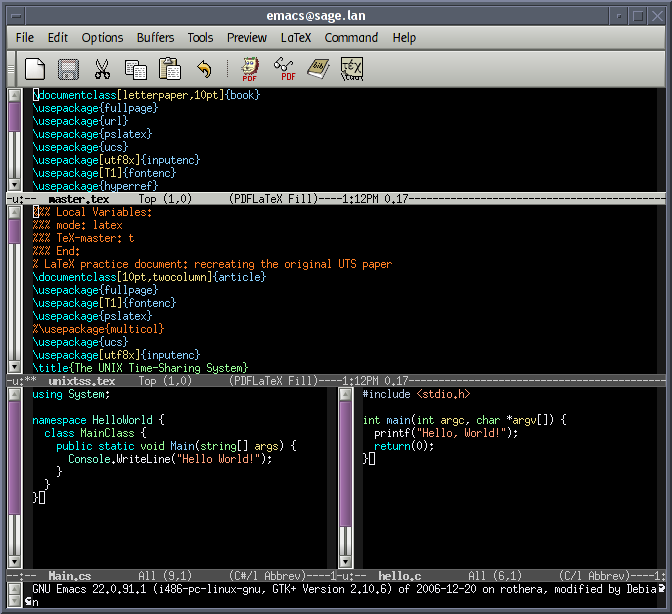
Emacs is a GUI editor (e.g. https://upload.wikimedia.org/wikipedia/commons/5/5a/Emacs-sc...), and the world still hasn't progressed beyond it. I'd love to be using something better than emacs, because it really is old & crufty, but literally no other environment is as powerful, as extensible and as pleasant to use.
That is a matter of opinion, which is what the OP before you was trying to point out. I know emacs, and use it as well when I'm in a shell environment, but I prefer to use Atom in a desktop environment where I may be copying and pasting from other apps. Pleasant is an opinion, which negates right and wrong.
A lot of people do not realize that they can use emacs on a terminal but also as a gui app. Also copying and pasting from other apps is possible and normal in emacs. For non ide languages i think emacs and vim are head and shoulders above any other editor, atom is really bad compared to emacs for example. The problem is that most people don't know how to use them.
It depends on your Atom config and your Emacs config, I imagine.
When I paste things into Atom or Jetbrains' Webstorm, my javascript usually gets auto-indented to The Right Place. Atom even did that when I _reordered_ lines, which was especially neat as I hadn't had Webstorm do it. This isn't something that my Emacs will do. I'd be _very_ surprised if there weren't some module, script, or Emacs configuration that I could use (or write) to get this same behavior. After all, Emacs' "Tab to The Right Indentation" was something that blew my mind years ago.
(Disclaimer: I have used Atom, but prefer Webstorm. I use Emacs, but only for Git things and the occasional quick edit.)
Not that you should have to know this, but for completeness' sake:
Out of the box in Emacs (with no config or extensions) you can simply select the pasted region and hit Tab to reindent the whole area correctly (what you called 'Tab to the Right Indentation').
Does what you'd like. This is all compositional, no magic here (and of course you can bind this all to one key press). Naturally lots of people make this auto-indent by default.
For me the most essential thing to know about those auto-indent modes is how to temporarily turn them off (like `:set paste` in Vim), since I so often need to bypass that behaviour for one reason or another (e.g. when resolving Git merges - trying to keep the original formatting).


I don't want to keep the wiki page super busy, so I now keep a text file with basically a much more verbose version of the same thing. What happened, what I tried, what I eventually found was the root cause, how I fixed it, and what I'm changing to prevent a repeat.
This has two big advantages. First, the obvious one is that when things act up I can sometimes find details on a previous incident that I don't remember very well. The second and I think even greater advantage, though, is that it forces me to actually think seriously about the root cause and preventative measures every single time, instead of just fixing the immediate problem and then going on to the next thing in a rush.