Curious to see how this goes. It seems to me it’s hard to match reality—for example, books, book shelves, pencils, drafting tables, gizmos, keyboards, mouse, etc. Things with tactile feedback. Leafing through a book typeset on nice paper will always be a better experience than the best of digital representations.
AR will always be somewhat awkward until you can physically touch and interact with the material things. It’s useful, sure, but not a replacement.
Haptic feedback is probably my favorite iPhone user experience improvement on both the hardware and software side.
However, I will never be able to type faster than on my keyboard, and even with the most advanced voice inputs, I will always be able to type longer and with less fatigue than if I were to use my voice—having ten fingers and one set of vocal cords.
All options are going to be valid and useful for a very long time.
> It seems to me it’s hard to match reality—for example, books, book shelves, pencils, drafting tables, gizmos, keyboards, mouse, etc. Things with tactile feedback. Leafing through a book typeset on nice paper will always be a better experience than the best of digital representations.
There's nothing tactile about a glass pane. It's simply a medium through which we access digital objects, and a very clunky one at that. Yet we got used to it in a very short amount of time.
If anything, XR devices have the possibility to offer a much more natural tactile experience. visionOS is already touch-driven, and there are glove-like devices today that provide more immersive haptics. Being able to feel the roughness or elasticity of a material, that kind of thing. It's obviously ridiculous to think that everyone will enjoy wearing a glove all day, but this technology can only improve.
This won't be a replacement for physical objects, of course. It will always be a simulation. But the one we can get via spatial computing will be much more engaging and intuitive than anything we've used so far.
> I will never be able to type faster than on my keyboard, and even with the most advanced voice inputs, I will always be able to type longer and with less fatigue than if I were to use my voice—having ten fingers and one set of vocal cords.
Sure, me neither—_today_. But this argument ignores the improvements we can make to XR interfaces.
It won't just be about voice input. It will also involve touch input, eye tracking, maybe even motion tracking.
A physical board with keys you press to produce single characters at a time is a very primitive way of inputting data into a machine.
Today we have virtual keyboards in environments like visionOS, which I'm sure are clunky and slow to use. But what if we invent an accurate way of translating the motion of each finger into a press of a virtual key? That seems like an obvious first step. Suddenly you're no longer constrained by a physical board, and can "type" with your hands in any position. What if we take this further and can translate patterns of finger positions into key chords, in a kind of virtual stenotype? What if we also involve eye, motion and voice inputs into this?
These are solvable problems we will address over time. Thinking that just because they're not solved today they never will be is very shortsighted.
Being able to track physical input from several sources in 3D space provides a far richer environment to invent friendly and intuitive interfaces than a 2D glass pane ever could. In that sense, our computing is severely constrained by the current generation of devices.
I recommend folks give “The Cathedral and the Bazaar” a read. Another good book is “Negotiating Rationally” (see below).
If the core developers/maintainers are putting in thousands of hours over several years, and a patch comes along, it is rightfully at the discretion of those doing 80-95% of the work.
But as negotiating rationally discusses, we value our work more than others—and there’s some emotional attachment. We need to learn to let that go and try to find the best solution, and be open to the bigger picture.
1. People get lazy when presented with four choices they had no hand in creating, and they don’t look over the four and just click one, ignoring the others. Why? Because they have ten more of these on the go at once, diminishing their overall focus.
2. Automated tests, end-to-end sim., linting, etc—tools already exist and work at scale. They should be robust and THOROUGHLY reviewed by both AI and humans ideally.
3. AI is good for code reviews and “another set of eyes” but man it makes serious mistakes sometimes.
An anecdote for (1), when ChatGPT tries to A/B test me with two answers, it’s incredibly burdensome for me to read twice virtually the same thing with minimal differences.
Code reviewing four things that do almost the same thing is more of a burden than writing the same thing once myself.
A simple rule applies: "No matter what tool created the code, you are still responsible for what you merge into main".
As such, task of verification, still falls on hands of engineers.
Given that and proper processes, modern tooling works nicely with codebases ranging from 10k LOC (mixed embedded device code with golang backends and python DS/ML) to 700k LOC (legacy enterprise applications from the mainframe era)
> A simple rule applies: "No matter what tool created the code, you are still responsible for what you merge into main".
Beware of claims of simple rules.
Take one subset of the problem: code reviews in an organizational environment. How well does they simple rule above work?
The idea of “Person P will take responsibility” is far from clear and often not a good solution. (1) P is fallible. (2) Some consequences are too great to allow one person to trigger them, which is why we have systems and checks. (3) P cannot necessarily right the wrong. (4) No-fault analyses are often better when it comes to long-term solutions which require a fear free culture to reduce cover-ups.
But this is bigger than one organization. The effects of software quickly escape organizational boundaries. So when we think about giving more power to AI tooling, we have to be really smart. This means understanding human nature, decision theory, political economy [1], societal norms, and law. And building smart systems (technical and organizational)
Recommending good strategies for making AI generated code safe is hard problem. I’d bet it is a much harder than even “elite” software developers
people have contemplated, much less implemented. Training in software helps but is insufficient. I personally have some optimism for formal methods, defense in depth, and carefully implemented human-in-the-loop systems.
[1] Political economy uses many of the tools of economics to study the incentives of human decision making
> As such, task of verification, still falls on hands of engineers.
Even before LLM it was a common thing to merge changes which completely brake test environment. Some people really skip verification phase of their work.
Agreed. I think engineers though following simple Test-Driven Development procedures can write the code, unit tests, integration tests, debug, etc for a small enough unit by default forces tight feedback loops. AI may assist in the particulars, not run the show.
I’m willing to bet, short of droid-speak or some AI output we can’t even understand, that when considering “the system as a whole”, that even with short-term gains in speed, the longevity of any product will be better with real people following current best-practices, and perhaps a modest sprinkle of AI.
Why? Because AI is trained on the results of human endeavors and can only work within that framework.
Agreed. AI is just a tool. Letting in run the show is essentially what the vibe-coding is. It is a fun activity for prototyping, but tends to accumulate problems and tech debt at an astonishing pace.
Code, manually crafted by professionals, will almost always beat AI-driven code in quality. Yet, one has still to find such professionals and wait for them to get the job done.
I think, the right balance is somewhere in between - let tools handle the mundane parts (e.g. mechanically rewriting that legacy Progress ABL/4GL code to Kotlin), while human engineers will have fun with high-level tasks and shaping the direction of the project.
The more tedious the work is, the less motivation and passion you get for doing it, and the more "lazy" you become.
Laziness does not just come from within, there are situations that promote behaving lazy, and others that don't. Some people are just lazy most of the time, but most people are "lazy" in some scenarios and not in others.
The thing is though, this story is a metaphor for life we’re living right now. Consider up in Canada the paper mills that were built near water streams, dumping mercury into indigenous people's food.
Many of which corporations exploited and/or mislead chiefs into believing the project would be safe.
Lots of nice thoughts that I agree with. But there is a lot of value creation in AI as well, beyond building things.
For example, how can doctors save time and spend more time one-on-one with patients? Automate the time-consuming, business-y tasks and that’s a win. Not job loss but potential quality of life improvement for the doctors! And there are many understaffed industries.
The balancing point will be reached. For now we are in early stages. I’m guessing it’ll take at least a decade or two for THE major breakthrough—whatever that may be. :)
I seriously question the premise that productivity gains from the use of AI (if they really exist) will translate into quality of life improvements. If 20 years of work experience has taught me anything, it's that higher productivity typically results in more busy work. More busy work or more work that gives the employer the most value rather than the customer or employee. So the doctor in your example gets more patients rather than higher quality interactions. Some people will get to see a doctor sooner but they still get low quality interactions.
>Some people will get to see a doctor sooner but they still get low quality interactions.
Or: The AI tooling will be able to allow the lay-person to double-check the doctor's work, find their blind spots, and take their health into their own hands.
Example: I've been struggling with chronic sinus infections for ~5 years. 6 weeks ago I took all the notes about my doctor interactions and fed them into ChatGPT to do deep research on. In particular it was able to answer a particularly confusing component: my ENT said he visually saw indications of allergic reaction in my sinuses, but my allergy tests were negative. ChatGPT found an NIH study with results that 25% of patients had localized allergic reactions that did not show up on allergy tests elsewhere on their body (the skin of my shoulder in my case). My ENT said flat out that isn't how allergies work and wanted to start me on a CPAP to condition the air while I was sleeping, and a nebulizer treatment every few months. I decided to run an experiment and I started taking an allergy pill before bed, while waiting for the CPAP+nebulizer. So far, I haven't had even a twinge of sinus problems.
Some allergy pills (diphenhydramine) are also so good at causing drowsiness they’re sold as sleep aides. Make sure you control for that in your personal testing.
I'm using Zyrtec (Cetirizine Hydrochloride), which among the second-gen allergy pills is more likely to cause drowsiness. My primary indicator is lack of sinus headaches at night and in the morning, there could be some correlation to sleeping through a headache if I'm drowsy because of it, but I also seem to be clear during the morning and day, and before going down this path I was lucky if I could go a month without just being miserable due to a headache. It's probably worth it for me to try another of the second gen options.
>Do you think they will spend more time with patients or take in more patients?
Well, taking in more patients per doctor is what will decrease the cost for the patient (so would increasing the number of doctors). Often, I'd rather be shuffled in and out in half the time, and be charged less, than charged the same and be given more time to talk with the doctor.
People working in specialized fields (doctors, programming, etc.) don’t get paid by the hour, they get paid for their expertise, so less time spent doesn’t mean a lower price.
I wish there was a “evergreen” feature for social sites where it tracked resubmissions and would auto suggest them to people who haven’t seen them and periodically surface them to those who have and ask “is this still relevant” That way really good content keeps being recommended to those who need it and you get fewer complaints from old timers who don’t have to see it N times.
My dream is a knowledge-aware Wikipedia that can be more relevant by understanding what the reader knows, might know and might find interesting w/o being overwhelming. I guess you can make this social too and have discussion groups, but it's already too large of a project in my mind.
Yeah people live by this leaky abstraction that an article having been posted before means everyone was online that day and saw it and now it has expired. And for some reason they chase these hall monitor points for pointing it out. Let's see what a discussion would be like from today's point of view.
Also: some people seem to get an amount of pleasure from pointing out repeats, as if remembering that something was posted before is knowledge enough to make them a better person than the poster, us all, or just the person they thought they were themselves. This is fine when something is posted far too often, or is reposted by a point-farming bot (presumably the users running such bots hope to use the reputation of the account somehow in future), but is often done overzealously.
The cheapest available model once you have Theory of Mind (the idea that the other things in the environment might be thinking like you do) is that they're you again.
The Smarties test (What's in this Smarties tube - look it's not Smarties, ok now what does somebody else think is in the tube?) shows that humans need a further step to discover that model isn't enough.
But it's still cheaper and it's pretty good. It will correctly predict that this person you've never met before probably wants cake not death, just like you. It won't reliably predict whether they prefer lemon cake or coffee cake. But it's a good first guess.
It is the same article each time, though the comments coming off the different postings of it might have unique nuggets of useful information to dig for.
> Thank you for providing links to the others though! I’m sure it will be helpful for someone.
It isn't as prominent as on other sites, so it isn't difficult to miss sat right at the bottom of the main page, but HN does have a working search function. I find searching for older posts this way can be quite useful for the above reason, when something comes up that has existed for a few years.
Personally, I don’t bother searching because I only consume the headlines, on other news sites too, come to think of it. There’s lots of interesting things people post but frankly I’d rather pay for a good book on any subject.
hides from the dreaded downvoters
I used to spend more time browsing when reading an actual newspaper or magazine. The discourse on opinion pieces and such is more thought out too—many people, myself included, post too quickly before thinking because we’re always on the go.
Something about the online experience consuming news is less satisfying. Perhaps a hacker out there can set up a print version of HN archives, and print it on a Gutenberg Press. :)
It seems the way to go would be to open source the SaaS code to ensure that longevity. The folks at Penpot have a good thing going with that—most people will use the SaaS offering but it’s available for self-hosting.
One of the difficulties of course is notarizing/signing the apps and so-forth. Perhaps some Web3 solutions could help as well.
OR, another option would be like what PICO-8 does (or flash I guess)—release the runtime and distribute the “carts” or apps. :)
Still, it’s pretty complex creating a trusted distribution network outside of SaaS. Definitely could work though it’s been done before!
I was also thinking back to when I used TiddlyWiki almost 20 years ago. If this tool is effectively just HTML, CSS, and Javascript... could they bake it all into a single HTML file. Download a template, design your app offline, and save your work to a file that can run on its own, offline, in a browser window. Maybe the about of JS they need to bake in, or images, would make that impractical.
Of course, as it stands, the examples were so simplistic that they could easily be vibe coded. I just tried it with the attendance counter and ChatGPT gave me that's only 50 lines. I'm sure I could make that much shorter doing it manually. Granted, a project like this has to start somewhere, but as it stands it's adding a lot of infrastructure without adding enough value to make it worth it, when AI is pretty good at these really basic things, like "give me a text box with a button to increment it".
Vibe coding may get the job done, but it isn't going to be as fun for someone who wants to write a little app for a friend. Also, chances are that the generated code is going to be less friendly for a novice to edit should the want/need to make changes.
I'm curious what's cognitively loading about three horizontal bars arranged in a square located in the corner of an app or website.
Screens, somewhat counterintuitively, used to be wider. Because they were not on handheld mobile devices. Then we had the menubar and nested dropdowns, suckerfish, etc. It was an exciting time to see a menu, you were never quite sure what you were going to get - I believe there are positives to learning curves for power users.
But I digress. 三 means 3 in Chinese. It doesn't take cognitive load. Why does a hamburger? I really am curious.
I use to know a gamer who used a phone for something like a decade. He got stuck doing something and I had to point out the burger to him. The thing he was looking for was interestingly enough not there. Apparently all websites he used were perfectly usable without knowing the button exists.
In contrast, some people can't not-read something and it being a button is automatically parsed out. Symbols and icons have to be learned which is a more gradual process. The other day I didn't recognize the flower icon for settings.
Three bars means... the exact same thing the thousands and thousands of times it's been seen before.
People have no inate understanding of 'menu'. We don't even read short words like that letter by letter, it's read as a block and is far more complex than three bars.
People spend years specifically learning how to read starting in early childhood. It's expected in the current era that people above a certain age are literate to at least some degree. People usually don't spend years specifically learning how to interpret icons except when they have to in an app or on a sign they run into.
"Menu" has a consistent meaning (a list of items to choose from) which most people can be assumed to know. Icons aren't as easily parsed and take more of a mental load to reason about them. Or just trial and error to figure them out.
I've seen too many variants of icons for "general" menu. Three bars, three dots, square, square in square, tall rectangle, gear, company logo and probably a few more.
And if we want to focus on just three bars let's not leave out the skeuomorphism trend where three bars meant the "grip" area, something to use to rearrange items or windows.
> Three bars means what, exactly? There’s the cognitive load.
This was true early on when it was not a common convention, or only used in mobile apps. Now, it is nearly universal, though still not nearly standard enough in placement or presentation.
If we were to redo history, it would've been great to see an expanding menu closely positioned by a top-left logo. Sort of like a Windows Start Menu for each website.
I couldn't agree more. The hamburger menu is in my list of the worst UI elements around. It has nothing good to recommend it.
It's barely tolerable in situations where screen space is at a premium, but it's still pretty awful.
> Its growing ubiquity helped standardize its meaning: Through repeated exposure, users learned to recognize and interpret the icon with increasing confidence.
Sure: it's the symbol of the "junk drawer" of the UI. Who knows what random assortment lurks in there? It's a place you go only as a last resort.
It wouldn't be fair to use "MENU", as not everyone speaks English, and regardless, many UIs aesthetically need an icon, so why not have standardized on one?
It's healthy to have decided on an icon, but I agree an ellipsis would've been (and still would be) intuitive too. Maybe designers trying to make their mark will start using ellipses in new designs... who knows.
Judging from the list of languages that have "menu" as a word (with a comparable definition to "menu"), I don't think it's a stretch for people to know what the word "menu" means: https://en.wiktionary.org/wiki/menu , it's not even originally an English word afterall.
You're assuming that it's an agreed and understood standard, which it really isn't. Tech savvy audiences often don't find it easy to understand that there are lots of people who don't understand things like this.
In terms of using MENU, if your audience is not English speaking then you can, and should, consider adding internationalisation and localisation as an alternative. If you have considered it for your content, it makes sense to consider it for your UI as well.
If the designer wants to encourage super-users and quicker access then splaying out all options is better. If they want "clean and tidy", the icon is better.
Heck, even when I have splayed out all the most-important options across the screen... where do I put the /rest/ of the menu options? in an "other" menu, likely drawn with 3 horizontal lines.
its true in many cases, those hold-everything menus end up has junk drawers that users have hard time navigating through, especially on mobile screens where not everything is shown at once AND the scroll indicator is by default hidden so its not obvious there are more items below the screen edge
No sorry - an ellipsis is the meatballs menu, not a hamburger. Different things. There’s also the kebab menu (also a different thing) and the fighting corn dogs menu …
A restaurant menu contains hamburgers, hotdogs, meatballs. A UI menu is represented by abstract icons of the items contained within a restaurant menu.
Now I am starting to like the hamburger menu after all… perhaps more as satire though. :)
For what it’s worth, ellipsis is the best of the bunch, because it means the same thing as in the written language, and is concise enough to use as a button that suggests what the action does.
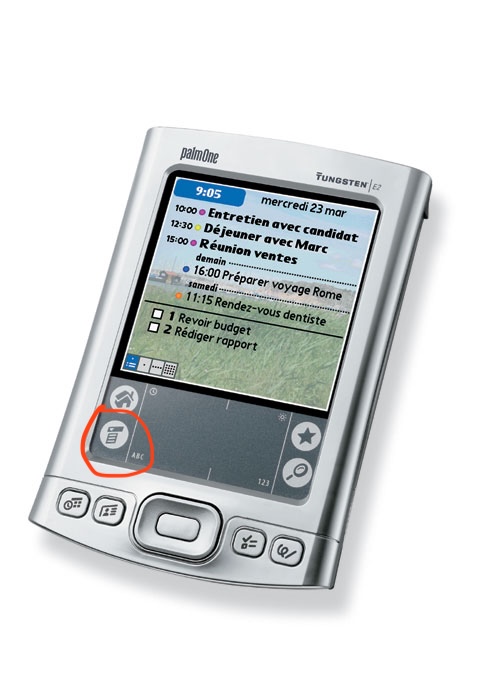
Even the palm pilot with its ridiculously tiny screen and bad touch ditigizer managed CUA-style menus.
Mobile UI design isn't about making things more understandable, it's about getting the user into a helpless and suggestible state so your ad impressions are worth more.
More than anything hamburger menu type design feels to me like an “avoid effort and skill as much as possible” sort of thing more than it does an “optimize ad revenue” sort of thing, as does flat design. It’s about lowering the bar for what’s acceptable to ship as far as you can possibly get away with. Plaster some scrolling flat rounded rectangles and a hamburger menu on the screen and boom you’ve got an app.
There is more than enough room for 4 menus across the top of a typical mobile device. If you expect the user to need to access it regularly, you could even put it across the bottom. This is why the homescreen on most phones has 4 items across the bottom; not a single hamburger menu with "Phone, Messages, Web, ..."
I'm curious, not a UI designer at all here, but what's so taxing about the hamburger? I grew up with it mostly always around and never even thought twice about it..
My problem with it mostly that it hides functionality. Seeing a hamburger menu gives you no insight as to what options exist under it.
The menu itself also tends to be a "grab bag" of multiple otherwise unconnected things, increasing the effort required to figure out how to do something.
I like to refer to them as junk drawers due to their messy nature.
Apps with hamburger menus also tend to have navigation that’s otherwise not well though out, think burying options in chains of modals where the paths to those options change whenever the app’s dev decides it wants to push a different feature/metric.
I like the "junk drawer" analogy. It's perfect. IMO if you as an app developer find yourself reaching for a hamburger menu, that's the time to step back and stop adding junk features, especially if you're writing a mobile app or web page. If you can't fit your application's critical functionality in, say, 4 tabs across the bottom of the app, the app is probably trying to do too much.
That’s often the case, but the other common problem is lack of consideration about hierarchy. It’s fine if every function of the app isn’t accessible with a single tap — that’s probably not necessary except for the app’s most pivotal functions, but most things should be able to be used within two taps and almost everything within three, with the paths being logical and predictable.
It’s plenty doable, but like I said it takes some sitting down and planning and perhaps more importantly, design centered around the user and their needs and less around looking pretty in a slideshow or trying herd the user around.
I know it's only anecdotal, but my mom doesn't get it. She's not super interested in her iPad and basically only uses it when she has to or for FaceTime. She'd be the perfect test subject for stress testing UIs and more interfaces than you'd think are doing a pretty poor job of explaining themselves. Not many icons are intuitive, hiding something in modal windows, muscle memory/dexterity and precision are all problem areas.
The hamburger is basically all of that rolled into one button. It's pretty abstract, you never know what's behind it and when they get fancy with animations and swipe gestures, it's almost always a failure.
I know it's a convenient way to clean up a screen, but the content in that menu needs to be absolutely optional for it to work.
As someone that has been learning new interfaces for the past 50-ish years as they randomly appear and mutate... I had no real idea what the icon might mean. Something that is stacked up that might drop down if I touch it? Could the lines mean a text document of some kind? Could it be a list of things? I got there eventually, but the word "menu" wouldn't have required any guessing on my part, for example. It was easier, though, than figuring out that the three vertical lines at the bottom of my android phone meant switch apps or that the rounded square meant "make the app go away, but don't kill it".
Because when I eat a hamburger, there isn't a whole restaurant inside it.
Nothing about the food suggests its function. And the function varies, it might be a whole rabbit-warren of menus and options. It might be a bunch of actions. It might just be one last item that wouldn't fit on the screen. It's an awful graphic for an awful concept. "We ran out of UI ideas so we just shoveled what was left into this junk drawer" is no way to go through life.
The implication of "load" is not that it's a huge hurdle, but just that it takes longer (even a tiny bit) for most users to visually assess what it means. Add up all those little delays, and you have a frustrated new user.
I regularly use a piece of software from IBM that has (this won't surprise you) an awful UI. There are not one but TWO hamburger menus, hidden amongst a bunch of text menu headings, and figuring out where the one you want is can be noticeably taxing. Explaining to another user where to click is even worse - "No, not that one, the one under the... to the right..."
> but just that it takes longer (even a tiny bit) for most users to visually assess what it means
Also as an example, three horizontal lines also sometimes get used as grips to indicate an element can be click-dragged around. It is less common than it used to be, though.
Any symbolic visual takes time for our brains to decode. When compared to language which we’ve spent our entire lives decoding and which comes much naturally, the cognitive burden is much higher.
In addition the three bars are as mundane of a composition as you can get, so it doesn’t capture the eye well to begin with. Typically the eye gets pulled to more visually complexity.
But ultimately it boils down to the decoding idea—language is the ultimate “codec” of human communication.
Isn't text a "symbolic visual"? I would think that at some point a symbol that's used as frequently as the hamburger icon would/could eventually become equivalent to the word.
> Typically the eye gets pulled to more visually complexity.
Written words have a "voice" - that part of your mind that recognizes something spoken. Hamburger menu icons don't have that, nor do they have the higher contrast or complexity that emoji have.
Yeah solarpunk is probably the most neglected out of all existing sci-fi punks, probably cause it's actually kinda nice and doesn't make a good setting for a gritty depressing story?
I’m sure someone has done this, but it would be interesting to study the overall tech landscape and compare which technology has sort of retained its value, depreciated, or increased in value—and how long those phases take. Even as far back as things like cast-iron printing presses and such. I mean also value in terms of usage not necessarily monetary.
The cycles we go through where a new tech supplants an old one, people thinking it’s the way of the future, and the old processes maybe forgotten for a while. Some might come back, others completely obsolescent. Still others the old tech might be superior to new—but more expensive (like old hard-wood window panes) and not sustainable.
I remember finding HeNe laser interferometers in an old HP catalogue from the '70s and being surprised that buying the equivalent system today from KeySight actually costs much more, even adjusted for inflation.


AR will always be somewhat awkward until you can physically touch and interact with the material things. It’s useful, sure, but not a replacement.
Haptic feedback is probably my favorite iPhone user experience improvement on both the hardware and software side.
However, I will never be able to type faster than on my keyboard, and even with the most advanced voice inputs, I will always be able to type longer and with less fatigue than if I were to use my voice—having ten fingers and one set of vocal cords.
All options are going to be valid and useful for a very long time.